aspnetcore mvc项目里的Serilog
新建mvc项目
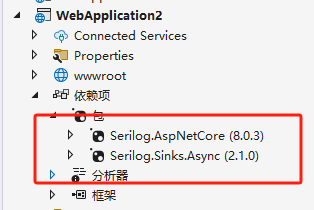
修改Program.cs
using Serilog.Events;
using Serilog;
var builder = WebApplication.CreateBuilder(args);
// Add services to the container.
builder.Services.AddControllersWithViews();
//配置日志
Log.Logger = new LoggerConfiguration()
#if DEBUG
.MinimumLevel.Debug()
#else
.MinimumLevel.Information()
#endif
.Enrich.FromLogContext()
.WriteTo.Async(c => c.File("Logs/logs.txt"))
.WriteTo.Async(c => c.Console())
.CreateLogger();
builder.Host.UseSerilog();
var app = builder.Build();
if (!app.Environment.IsDevelopment())
{
app.UseExceptionHandler("/Home/Error");
app.UseHsts();
}
app.UseHttpsRedirection();
app.UseStaticFiles();
app.UseRouting();
app.UseAuthorization();
app.MapControllerRoute(
name: "default",
pattern: "{controller=Home}/{action=Index}/{id?}");
app.Run();
下面代码就是新增的日志配置
Log.Logger = new LoggerConfiguration()if DEBUG
.MinimumLevel.Debug()
else
.MinimumLevel.Information()
endif
.Enrich.FromLogContext()
.WriteTo.Async(c => c.File("Logs/logs.txt"))
.WriteTo.Async(c => c.Console())
.CreateLogger();
builder.Host.UseSerilog();
修改HomeController.cs
using Microsoft.AspNetCore.Mvc;
using System.Diagnostics;
using WebApplication2.Models;
namespace WebApplication2.Controllers
{
public class HomeController : Controller
{
private readonly ILogger<HomeController> _logger;
public HomeController(ILogger<HomeController> logger)
{
_logger = logger;
}
public IActionResult Index()
{
_logger.LogInformation("This is a test log message"); // 记录日志
return View();
}
}
}
ABP中的日志
Program.cs
using System;
using System.Threading.Tasks;
using Microsoft.AspNetCore.Builder;
using Microsoft.Extensions.DependencyInjection;
using Microsoft.Extensions.Hosting;
using Serilog;
using Serilog.Events;
namespace Acme.BookStore.Web;
public class Program
{
public async static Task<int> Main(string[] args)
{
//配置日志
Log.Logger = new LoggerConfiguration()if DEBUG
.MinimumLevel.Debug()
else
.MinimumLevel.Information()
endif
.MinimumLevel.Override("Microsoft", LogEventLevel.Information)
.MinimumLevel.Override("Microsoft.EntityFrameworkCore", LogEventLevel.Warning)
.Enrich.FromLogContext()
.WriteTo.Async(c => c.File("Logs/logs.txt"))
.WriteTo.Async(c => c.Console())
.CreateLogger();
try
{
Log.Information("Starting web host.");
var builder = WebApplication.CreateBuilder(args);
builder.Host
.AddAppSettingsSecretsJson()
.UseAutofac()
.UseSerilog();
//.UseSerilog((context, services, loggerConfiguration) =>
//{
// //loggerConfiguration.WriteTo.File("Logs/log.txt");
// //loggerConfiguration.WriteTo.Console();
// //loggerConfiguration.WriteTo.Async(c => c.AbpStudio(services));
//});
await builder.AddApplicationAsync<BookStoreWebModule>();
var app = builder.Build();
await app.InitializeApplicationAsync();
await app.RunAsync();
return 0;
}
catch (Exception ex)
{
Log.Fatal(ex, "Host terminated unexpectedly!");
return 1;
}
finally
{
Log.CloseAndFlush();
}
}
}
//日志的配置
Log.Logger = new LoggerConfiguration()if DEBUG
.MinimumLevel.Debug()
else
.MinimumLevel.Information()
endif
.MinimumLevel.Override("Microsoft", LogEventLevel.Information)
.MinimumLevel.Override("Microsoft.EntityFrameworkCore", LogEventLevel.Warning)
.Enrich.FromLogContext()
.WriteTo.Async(c => c.File("Logs/logs.txt"))
.WriteTo.Async(c => c.Console())
.CreateLogger();
//下面必需有
.UseSerilog();
在模块的OnApplicationInitialization中加
app.UseAbpSerilogEnrichers();修改首页Index.cshtml.cs
using Microsoft.AspNetCore.Mvc;
using Microsoft.Extensions.Logging;
namespace Acme.BookStore.Web.Pages;
public class IndexModel : BookStorePageModel
{
private readonly ILogger<IndexModel> _logger;
public IndexModel(ILogger<IndexModel> logger)
{
_logger = logger;
_logger.LogInformation("Logging from OnGet method");
}
public void OnGet()
{
_logger.LogInformation("Logging from OnGet method");
}
}
然后就能在Logs/logs.txt查看日志了
作者
吴晓阳(手机:13736969112微信同号)